
Print to Size
開發者:Clafou Ltd
iOS · 圖形與設計、照片與影片 · 開發者未認領
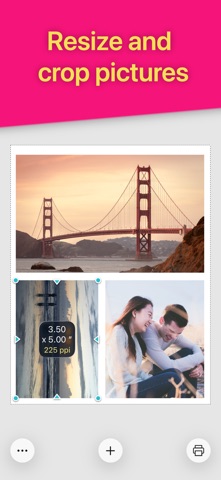
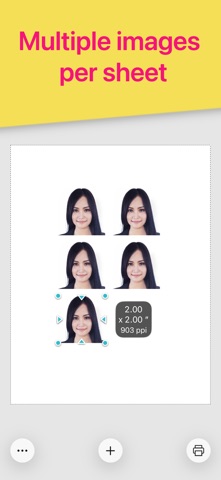
Print images exactly how you want them on the page. Resize and crop in inches or centimeters. Print multiple photos on one sheet. No more surprises or waste. REAL SIZES Size and crop your images in inches or centimeters. Each printed image will match exactly the size displayed on screen. HIGH QUALITY Will it look pixelated? The PPI (DPI) display tells you. For best results avoid stretching photos below 200-300 PPI. Each image is sent to the printer at full resolution to guarantee optimal quality. SAVE PAPER Place multiple images anywhere on the page. Fill the empty spaces on your sheet and use less paper. SAVE INK Choose the most economical print mode (photo or general quality, color or grayscale). Crop to print only what you need and waste no ink. Intuitive and quick to use with familiar touch gestures: • Select your paper size • Add images • Size and crop them to exact dimensions anywhere inside the page • Align, rotate, flip and duplicate • Choose your mode (photo or general quality, color or grayscale) then print. Requires an AirPrint compatible printer. If you don't have one, you can still use this app to create a PDF or JPEG file that you can then print via other methods. Perfect for all kinds of printing projects: • Picture frames • Greeting cards • Scrapbooking • Arts and crafts • Collages • Door signs • Labels • Badges Printer manufacturers have ink and photo paper to sell, so their apps aren’t designed to help avoid waste. This app is different. It is designed to let you get it right the first time. DOWNLOAD NOW and make the best use of your ink and paper!
介紹語言:英文(開發者提供的原文,未翻譯)
價格
- 下載
- NT$90
- App 內購買
- 未確認
截圖


評分
4.7 · 7 則評分
App Store・台灣
版本更新
- 最近更新
- 版本 1.12 · 2026年11月15日
更新內容
補充資訊
- 首次上架
- 2015年1月21日
- App 介面語言
- 德文、英文、西班牙文、法文、日文、中文(繁簡未確認)
- 內容分級
- 4+
資料來源:Apple App Store 公開資料
資料更新時間:2026年11月20日 凌晨2:53