
NaviBeat: Navidrome Player
開發者:Nenad Jokic
iOS · 娛樂、音樂 · 開發者未認領
NaviBeat brings your own music library to every Apple device you own: iPhone, iPad, Mac, Apple TV, and Apple Watch, plus CarPlay, as a single Universal Purchase. Pay once.
介紹語言:英文(開發者提供的原文,未翻譯)
價格
- 下載
- NT$190
- App 內購買
- 未確認
截圖




介紹
顯示全文
NaviBeat brings your own music library to every Apple device you own: iPhone, iPad, Mac, Apple TV, and Apple Watch, plus CarPlay, as a single Universal Purchase. Pay once.
No subscriptions. No ads. No tracking. No NaviBeat cloud. Your music stays on your own server, exactly where you put it. NaviBeat just plays it, beautifully.
ABOUT NAVIDROME
NaviBeat is a client for Navidrome, the free and open-source self-hosted music server. Run Navidrome on a NAS, a Raspberry Pi, a VPS or any machine you control, and NaviBeat streams your collection to every Apple device. Airsonic-Advanced, Gonic and any OpenSubsonic server work too.
ON iPHONE & iPAD
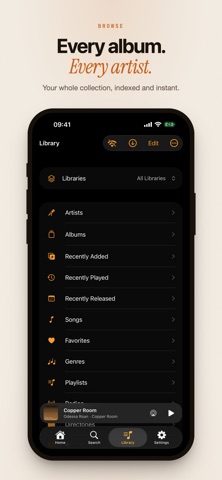
- Browse artists, albums, playlists and genres
- Voice and text search with live results
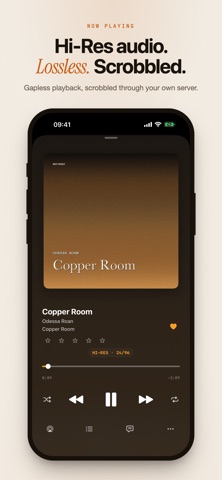
- Now Playing with synced lyrics
- Background audio, Control Center, AirPlay, Lock Screen and Home Screen widgets
- Offline: keep a song, an album, a playlist or a whole artist on the device
- Listening Stats: a 24-hour clock, a weekday heatmap, your top artists and songs
- Smart Playlists you write yourself, from rating, genre, year, play count and more, kept current and synced across your devices
- Start on one device and carry on with another. The device you left pauses itself
IN THE CAR
- Full CarPlay support, included in the same purchase
- Your library, playlists, downloads and Now Playing on the car screen
- Voice search that resolves the play command against your own library, not a streaming catalogue, in every language the app ships
ON MAC
- A real Mac app, not a phone app in a window
- A Mini Player that pins over any window
- Keyboard shortcuts, multi-window and directory browsing, desktop widgets
- NaviSyncRock: sync your library to a Rockbox player. Your server does the transcoding, art is re-encoded so it renders, and plays sync back. A separate one-time in-app unlock.
ON APPLE TV
- Cinema-scale artwork and discovery shelves
- Recently Played, Most Played, Rediscover, On This Day, Because You Listened To
- Voice search via the Siri Remote
- Full-screen Now Playing with synced lyrics
ON APPLE WATCH
- Now Playing complications on any watch face
- Music stored on the watch and played from it, so you can run without your iPhone
- Downloads pulled straight from your server over Wi-Fi
AUDIO
- Selectable high-fidelity playback engine
- 10-band equalizer with presets
- ReplayGain volume normalisation, per track or per album
- Gapless playback
- Streaming quality set separately for Wi-Fi and cellular, in Opus, AAC and MP3 tiers, or send the original file untouched
- Internet radio
YOUR LIBRARY, YOUR WAY
- Multi-library Navidrome support: All Libraries, a single library, or any subset, filtered on the server
- Star ratings synced to your server
- Classical music: automatic work and movement grouping
- Optional Last.fm and ListenBrainz integration. Scrobbles route through your own server, never directly from the app.
- Server Health diagnostics: server type, version, OpenSubsonic extensions, scan status
REACHING YOUR SERVER
Built for a locked-down homelab. Custom HTTP headers for Cloudflare Access and Authelia, mTLS client certificates, and access over Tailscale all work, on every platform, with no third-party relay in between.
MULTIPLE LANGUAGES
The app comes in multiple languages, with an in-app language picker on every platform.
REQUIREMENTS
NaviBeat requires a running Navidrome server (v0.50 or later, free and open source) accessible from your Apple device. Self-host it on a home NAS, a Raspberry Pi, a VPS, or any machine you control. See navibeat.app for setup.
NaviBeat is a third-party client, not affiliated with the Navidrome project.
PRIVACY
NaviBeat collects zero data. There is no NaviBeat backend, no analytics, no telemetry and no third-party SDKs. Your credentials live in your device's Keychain. Your listening history stays on device. See navibeat.app/privacy.
評分
尚無評分
App Store・台灣
前往 App Store 查看更多評價版本更新
- 最近更新
- 版本 1.5.10 · 2026年11月12日
更新內容
RELEASED ON THIS DAY
A new Home shelf: albums released on this date in earlier years, from the original date tag first.
CROSSFADE WITH THE EQUALIZER
With the equalizer on, crossfade no longer jumps in volume at the start or cuts the end of a song.
ALBUMS PICK UP WHERE YOU LEFT OFF
Play on an album page continues from the last song you heard, the same as the album on Home. A finished album starts again from the first song.
UPNP AND DLNA SPEAKERS
When the speaker moves to the next song by itself, NaviBeat follows it. audio/x-flac plays as FLAC. A speaker that already plays a song from your queue is taken over. The Playing on bar has the speaker volume and a speaker menu.
FAVORITES
New Favorite Artists shelf on Home. A heart you set while your server cannot be reached is saved at once and shows in Favorites.
ALSO NEW
Apple Watch with a server behind a client certificate (mTLS): the iPhone gives the certificate to the watch, so the watch can browse and download. It plays downloaded songs.
Mobile data: songs ahead are downloaded only after the song that plays has run 20 seconds, so skipping no longer downloads whole songs.
Artists: a filter by song count, All, 6+ or 10+. All Songs on an artist remembers the last song and asks Continue or Start Over, and shows in Continue on Home.
Filled Now Playing: the cover starts at the top of the screen and shows the full square. With the fade off, the title sits right under it.
Now Playing in landscape with Text first keeps the left column on screen.
Filled page: artists and times stay readable on covers that are bright at the top.
Copy Share Link in the long press menu of an album.
CarPlay: the artist page follows the Show Top Songs switch.
Navigation prompts: if iOS never says the prompt ended, the music comes back after 8 seconds.
Show source in shelf titles: a new switch in Settings, Music Data.
補充資訊
- 首次上架
- 2026年5月22日
- App 介面語言
- 加泰蘭文、德文、英文、西班牙文、法文、義大利文、波蘭文、葡萄牙文、俄文、塞爾維亞文、烏克蘭文、中文(繁簡未確認)
- 內容分級
- 4+
資料來源:Apple App Store 公開資料
資料更新時間:2026年11月18日 下午3:04