
Print to Size
Developer: Clafou Ltd
iOS · Graphics & Design、Photo & Video · Not claimed by developer
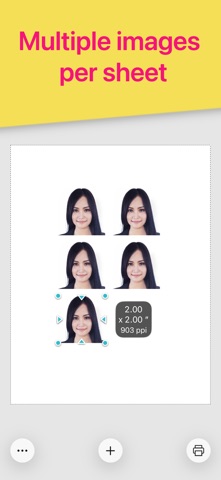
Print images exactly how you want them on the page. Resize and crop in inches or centimeters. Print multiple photos on one sheet. No more surprises or waste. REAL SIZES Size and crop your images in inches or centimeters. Each printed image will match exactly the size displayed on screen. HIGH QUALITY Will it look pixelated? The PPI (DPI) display tells you. For best results avoid stretching photos below 200-300 PPI. Each image is sent to the printer at full resolution to guarantee optimal quality. SAVE PAPER Place multiple images anywhere on the page. Fill the empty spaces on your sheet and use less paper. SAVE INK Choose the most economical print mode (photo or general quality, color or grayscale). Crop to print only what you need and waste no ink. Intuitive and quick to use with familiar touch gestures: • Select your paper size • Add images • Size and crop them to exact dimensions anywhere inside the page • Align, rotate, flip and duplicate • Choose your mode (photo or general quality, color or grayscale) then print. Requires an AirPrint compatible printer. If you don't have one, you can still use this app to create a PDF or JPEG file that you can then print via other methods. Perfect for all kinds of printing projects: • Picture frames • Greeting cards • Scrapbooking • Arts and crafts • Collages • Door signs • Labels • Badges Printer manufacturers have ink and photo paper to sell, so their apps aren’t designed to help avoid waste. This app is different. It is designed to let you get it right the first time. DOWNLOAD NOW and make the best use of your ink and paper!
Price
- Download
- NT$90
- In-app purchases
- Not confirmed
Screenshots



Rating
4.7 · 7 ratings
App Store · Taiwan
Version history
- Last updated
- Version 1.12 · Nov 15, 2026
What's new
More information
- First released
- Jan 21, 2015
- App languages
- German, English, Spanish, French, Japanese, Chinese (Traditional/Simplified not confirmed)
- Age rating
- 4+
Source: Apple App Store public data
Data updated: Nov 19, 2026, 10:53 AM