
Orca IDE
Developer: Lovecast LLC
iOS · Developer Tools · Not claimed by developer
Orca Mobile is the companion app for Orca, the open-source agentic coding workspace for macOS, Linux, and Windows. Pair your iPhone to your desktop in seconds and pick up a terminal session from the couch, the kitchen, or across the office.
Price
- Download
- Free
- In-app purchases
- Not confirmed
Screenshots


Description
Show full description
Orca Mobile is the companion app for Orca, the open-source agentic coding workspace for macOS, Linux, and Windows. Pair your iPhone to your desktop in seconds and pick up a terminal session from the couch, the kitchen, or across the office.
WHAT IT DOES
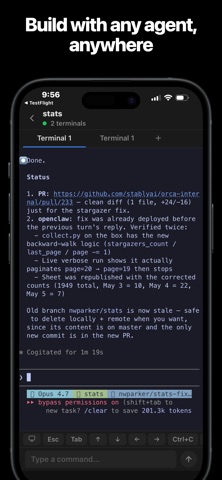
• Live mirror of your desktop terminal, including running AI agent sessions (Claude Code, Codex, custom CLIs).
• Full keyboard input — type, tab-complete, Ctrl-C, scroll back, all from the phone.
• Multi-worktree, multi-terminal: jump between projects with a tap.
• Phone-fit zoom and a smart on-screen keyboard with quick Ctrl/Alt accessory keys and shortcuts.
• Background long-running commands and get a notification when a TUI goes idle (e.g. when Claude finishes thinking).
HOW IT WORKS
Orca Mobile is a thin client. Nothing runs on your phone except the viewer. Your code, your shells, your AI agents — all of that stays on your desktop. The phone shows you what's happening and forwards your keystrokes back over an encrypted local-network connection.
Pairing is end-to-end encrypted. Your desktop generates a one-time keypair and shows a QR code; you scan it from the app. After that, all traffic between phone and desktop is sealed with that pair's keys.
PRIVACY
• No analytics SDK, no crash reporter, no third-party SDKs of any kind in the iOS app.
• Pairing tokens and your preference list live in the app's own sandbox. The app's traffic to your desktop is end-to-end encrypted on your local network only.
• The Orca desktop app collects anonymized usage metrics per the policy at https://www.onorca.dev/privacy. The mobile app itself does not.
• Open source: every line is auditable at https://github.com/stablyai/orca.
REQUIREMENTS
• An iPhone (iOS 16+) on the same Wi-Fi as your desktop.
• The Orca desktop app, free, from https://www.onorca.dev/ or https://github.com/stablyai/orca/releases.
Rating
4.7 · 79 ratings
App Store · United States
See more reviews on the App StoreVersion history
- Last updated
- Version 0.0.65 · Nov 17, 2026
What's new
Faster everywhere
• The app opens on your last screens and refreshes them in the background, so Home, workspaces, chats, tasks, pull requests and files show up straight away.
• Desktop updates now download in the background and apply the next time you open the app. Downloads are much smaller, and the progress shows the real download size.
• Switching between terminals no longer rebuilds them, and pages open faster.
Agents
• A new Agents tab lists every agent across your desktops. Mark them as read or clear them.
• Feed shows agents that are working in an Active section.
Chat
• Rewind to an earlier message, fork a reply into a new chat, or continue a reply that was stopped.
• The agent's plan stays pinned above the composer, and a ring shows how much context is used.
• Paste images and long text. Math, GitHub alerts and task lists now render, and older messages show their date.
• Set a goal for a chat, sign in to an agent from the chat, and switch accounts when you hit a usage limit.
• Drafts, attachments and unsent messages are kept if the app closes. Messages sent while your desktop is offline go out when it reconnects.
Dictation
• Dictation can run on your phone, with your computer as a fallback.
• Keep dictating after you leave a session, and retry a dictation that failed.
Source control and files
• Source Control works in folder workspaces, and CI results show as one-line cards.
• Commit, pull request and review drafts are kept if the app closes.
• Large folders load in pages, with search across the whole folder. Copy a file's name or path.
Terminal
• The key row adds Shift, Ctrl and Alt, plus optional agent keys.
Also
• Rename a workspace from its menu, and create a workspace for each repository in a folder workspace.
• Fixes for switching between Wi-Fi and relay, selecting text on Android, and iPad page headers.
Some features need the latest Orca desktop app.
More information
- First released
- May 7, 2026
- App languages
- German, English, Spanish, French, Japanese, Korean, Portuguese, Russian, Turkish, Chinese (Traditional/Simplified not confirmed)
- Age rating
- 4+
Source: Apple App Store public data
Data updated: Nov 18, 2026, 11:04 PM